TL;DR
Choose by the skill your child is working on. First grade math is mostly addition and subtraction within 20 (with strategies such as counting on and making ten) plus tens and ones. The best math apps for 1st grade are the ones that practice that part of the year.
For a full year of grade-level lessons for free, look at Zearn. Khan Academy Kids is the other strong free pick, especially for a child who is at or a little below grade level.
For addition and subtraction facts, try Monster Math, Todo Math or DragonBox Numbers. Each targets a narrower slice of the year, and each needs a paid plan for full access. Monster Math is free for 10 levels a day.
For making ten, use the free Number Rack and Number Frames apps with your child next to you. They are digital versions of the bead racks and ten-frames many 1st grade classrooms use.
Keep expectations modest. Across 36 studies, apps helped young children's math and reading, but the average gain for kindergarten to 3rd grade was small, and smaller on standardized tests.
Your 6-year-old comes home with a worksheet that says "make a ten to add 8 + 6," and you realize the app on the tablet has only ever asked for flash-card answers. Or the teacher mentions place value at conferences, and you wonder whether the bubble-popping game your child loves goes anywhere near it.
This list is for the parent of a 6–7 year old, and it sorts math apps for first graders by what 1st grade math asks for. Every price, age range and feature below comes from the app's own website or store listing, checked November 19, 2026.
Full disclosure: we make Monster Math, which is on this list. We've tried to be as specific about its gaps as about everyone else's.
What math does a 1st grader actually need to practice?
Under the Common Core, which many US states use or adapt, 1st grade focuses on four critical areas: addition and subtraction within 20 and strategies for doing them, whole-number relationships and place value (grouping in tens and ones), measuring length, and reasoning about shapes.
The addition standard is more specific than many parents expect. Children are asked to add and subtract within 20 and be fluent within 10, using strategies such as counting on and making ten (for example, 8 + 6 = 8 + 2 + 4 = 10 + 4 = 14). That is why homework looks different from the flash cards many of us grew up with. If the term is new, our explainer on what counting on is and when children stop counting from 1 walks through it.
First graders are also expected to count to 120 starting at any number and understand that the two digits of a two-digit number stand for tens and ones.
No single app covers all of that well. Here is how the apps below line up against the year, based on what each one's own listing says it teaches.
For the full list of end-of-year skills, our 1st grade math milestones checklist breaks them down with examples.
Do math apps actually help 1st graders?
Somewhat, and the studies also say a little about which kind of app to pick.
The average gain is small at this age. A meta-analysis of 36 studies of educational apps for preschool to 3rd grade found an average gain of 0.31 standard deviations, with similar effects for math and literacy. The same analysis found the predicted effect was about half as large for kindergarten to 3rd grade samples (g = 0.17) as for preschoolers (g = 0.35), and smaller on standardized tests than on tests the researchers wrote themselves. Only 17% of the studies were in 1st grade, so treat this as a broad picture.
Many popular "educational" apps aren't built to teach. When researchers scored 124 popular children's apps on whether they make children think, keep them focused, connect to everyday life and involve real interaction, 72 of the 124 (58%) counted as lower quality. Free apps scored lower than paid ones on keeping children focused, because of distracting extras (the scoring marked apps down for disruptive ads and for rewards unrelated to the learning). The study rated app design, not what children learned. Its sample leaned young, since 24 of the apps were picked because preschoolers played them most, and it was taken at one point in time.
Feedback and levels matter. An analysis of 23 math apps tested with children in their first three years of school found that learning gains were stronger when apps combined a scaffolded, personalized sequence of levels with explanations of why an answer was right or wrong, plus praise. That comparison rested on only eight studies, mostly with typically developing children in the US and England, so the authors call for caution.
In practice, look for an app that explains mistakes instead of just buzzing, moves your child up and down levels, and has no third-party ads. None of these studies tested the specific apps below unless we say so.
The 8 best math apps for 1st grade at a glance
Prices are from each app's own site or US App Store listing, checked November 19, 2026. Store prices change, and some listings show several plans, so check before you subscribe.
The 8 apps, and what each one covers in 1st grade
1. Zearn: best free option for a full year of grade-level lessons
Covers: the whole school year, lesson by lesson
Cost: free family accounts
Zearn says its more than 1,000 digital lessons cover every major concept of K-8 math, with the K-5 content built on Eureka Math. Children solve problems with visual models and digital manipulatives. Teachers and families can create free accounts, and Zearn says it does not show ads to students.
That makes it the closest thing here to a free, structured 1st grade curriculum, including place value as well as facts. If your child's school uses Eureka Math, the models may look familiar.
Where it falls short: Zearn describes its lessons as guided instruction using pictures and objects, so it is built around lessons more than game play. It may suit a child who is ready to sit and follow a lesson better than one who needs something playful to get started.
2. Khan Academy Kids: best free all-rounder for kids at or below grade level
Covers: counting, addition, shapes, plus reading
Cost: free
The App Store listing describes 5,000+ learning games, books and videos for kids ages 2–8, and says the app is 100% free, with no ads and no subscriptions. In 2020 Khan Academy announced it had added more than 5,700 activities aligned with first-grade English Language Arts and math Common Core standards. It's also on Google Play.
If you want one free app for a child who is still firming up kindergarten skills, or a younger sibling to share it with, this is the easy choice.
Where it falls short: math is one strand among many, and the App Store files it under "Made for Ages 0–5." A 1st grader who is already comfortable within 20 may find the math too easy, and the listing doesn't say how far its place value work goes.
3. Monster Math: best for untimed addition and subtraction strategies
Covers: adding and subtracting 1 or 2 within 10, doubles within 20, combinations of 10
Cost: free for 10 levels a day; $59.99 a year for full access, with a 7-day free trial
This is our app, so read this entry with that in mind. The homepage describes Monster Math as math fact fluency for grades K-3 (about ages 5–9), and the App Store listing is labeled "1st, 2nd & 3rd Grade Learning" and "Made for Ages 6–8". Its curriculum page starts at grade 1 and lists these 1st grade skills: adding and subtracting 1 or 2 within 5 and within 10, doubles within 10 and 20, and combinations of 10. Making 10, near doubles and "10+ facts" are listed as coming soon.
The homepage promises no timers, no loud sounds and no flashy animations, and the App Store listing says "No time limits, no penalties, and no distractions" and describes the app as ad-free. It runs in the browser and as an app on iPad, iPhone and Android. Kids can play 10 levels a day at no cost. Full access is $59.99 a year after a 7-day free trial, and a credit card is needed to start the trial.
It carries an ESSA Tier IV label, which means it "demonstrates a rationale" for effectiveness. That is the entry level: it reflects research-based design, and the page doesn't describe a trial of Monster Math itself.
Where it falls short: it covers one strand of the 1st grade year. Its curriculum page lists nothing on place value, counting to 120, measurement, time or shapes, and making ten isn't live yet. If your child needs tens and ones, Zearn, Todo Math or SplashLearn go further.
4. SplashLearn: widest spread of 1st grade topics in one app
Covers: place value, facts, time, measurement, word problems
Cost: subscription after a free trial
SplashLearn's App Store listing names more 1st grade topics than any other app here: "Grade 1: Place value, subtraction, telling time, math facts, measurement, basic word problems". It covers preschool to grade 5 in math and reading, says it adapts to each child's level, and describes itself as having "No ads, no pop-ups, no distractions".
It's a good fit if you want one app that touches the time and measurement units too, rather than only arithmetic. It's also on Google Play.
Where it falls short: pricing is hard to read. The US listing shows several membership plans, from $7.99 to $11.99 a month and $69.99 to $89.99 a year, so check which one you're being offered after the trial.
5. Todo Math: best for place value and two-digit work, with accessibility options
Covers: place value, simple geometry, addition with carrying and subtraction with borrowing
Cost: free to try; one-year plans listed from $49.99 to $99.99
Todo Math's listing describes 2,000+ activities for pre-K through 2nd grade, organized in levels. Level D, "1st Grade Basics," covers place value and simple geometry, and Level E, "1st Grade Mastery," covers carry-over addition, subtraction with borrowing, and dividing a plane figure equally.
It has a dyslexic font and a left-handed mode, it can be played without an internet connection, and the developer says it does not contain any third-party advertising. It's also on Google Play.
Where it falls short: the App Store lists one-year plans at $49.99, $69.99, $79.99 and $99.99 and two-year plans up to $119.99, without saying which one you'll be offered or how much stays free if you don't subscribe.
6. DragonBox Numbers and Big Numbers: best for number sense, then tens and ones
Covers: numbers to 20 (Numbers), base ten and long addition and subtraction (Big Numbers)
Cost: in-app purchases listed at $5.99 a month, $35.99 a year or $19.99 one-time
These are two separate apps, now sold under Kahoot!. Kahoot! recommends Numbers for ages 4–8 and Big Numbers for ages 6–9, though the App Store files Numbers under "Made for Ages 0–5." In Numbers, children learn addition and subtraction with numbers between 1 and 20. Big Numbers says "Kids as young as 6 can learn how the base-ten system works and how to perform long additions and subtractions".
For a 1st grader, Numbers fits the first half of the year and Big Numbers the place value half. A child who is strong within 20 can go straight to Big Numbers.
Where it falls short: both listings say access to the contents requires a Kahoot! Kids subscription (a one-time purchase is also listed), so the free download alone won't get you far. Both are on Google Play as well as the App Store.
7. Number Rack and Number Frames: best free tools for making ten
Covers: combinations of 5 and 10, making ten, numbers to 20 and 100
Cost: free
These come from The Math Learning Center, which says its apps are free and based on the visual models in its Bridges in Mathematics curriculum, with a web version for modern browsers and iOS versions. In Number Rack, children slide beads to show numbers and think in groups of 5s and 10s. Number Frames lets them place counters in five-, ten- and double ten-frames to structure numbers to 5, 10, 20 and 100. The Number Rack iPad app's privacy label reads "Data Not Collected".
These are open tools with no levels or scores, and nothing marks an answer right or wrong. That suits the making-ten strategy in 1st grade homework. You set up 8 + 6 on a double ten-frame together, move two counters to fill the first ten, and read off "10 and 4 more is 14." When 1st graders move on to adding two-digit numbers, the standards ask them to do it using concrete models or drawings, and a ten-frame on a screen is one of those models.
Where they fall short: a 6-year-old won't get much from them alone. Plan to sit with your child, at least for the first few sessions.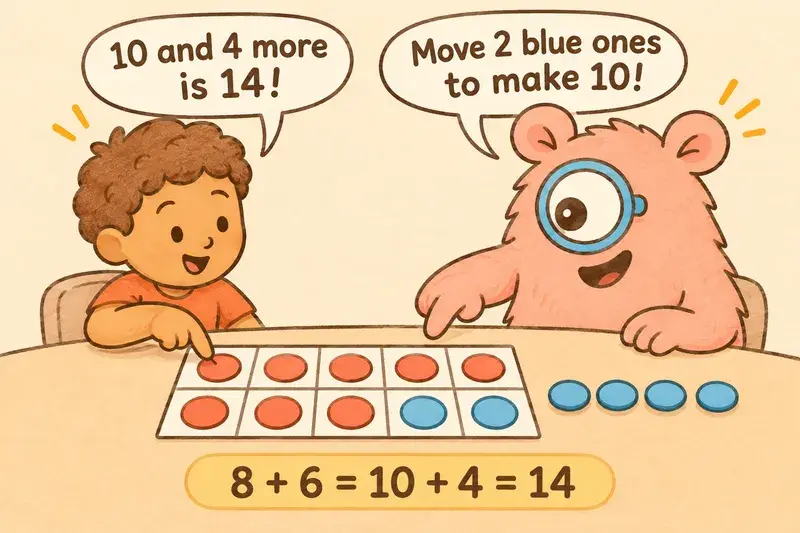
8. Bedtime Math: best for word problems you do together
Covers: everyday word problems at three levels
Cost: free
Bedtime Math is a free app of short math stories, aimed at families with kids ages 3–9, with three questions at different levels of challenge, from "Wee Ones" up to "Big Kids." It's meant to be read with a parent, which fills a gap most apps leave open. In the 124-app review above, social interaction was the lowest-scoring of the four qualities.
In a randomized trial with 586 first graders at home, included in the meta-analysis above, the overall effect was small (g = 0.10), with a confidence interval that included zero. The developer's listing makes a bigger claim of three extra months of growth in a school year. Treat it as a pleasant habit that keeps math talk going at home.
Where it falls short: it's word problems only, with no fact practice or place value sequence, and the App Store version is listed for iPhone and iPad.
Which math app fits your 1st grader?
Use your child's current sticking point to choose, and pick one main app rather than three.
Still counting everything from 1: start with Number Frames or Number Rack alongside you, then add Khan Academy Kids or DragonBox Numbers for independent practice.
Knows facts within 10 but stalls within 20: build make-ten sums together in Number Frames first, since making ten is the step that gets sums past 10 moving. For practice on their own, DragonBox Numbers works with numbers up to 20, and Monster Math covers doubles within 20.
Struggling with tens and ones: Zearn, Todo Math (Levels D and E) or DragonBox Big Numbers.
You want one app for the whole year: Zearn if you want free and structured, SplashLearn if you want time and measurement in the same place.
Already ahead: DragonBox Big Numbers or Todo Math's 2nd grade levels, plus the "Big Kids" questions in Bedtime Math.
Gets upset by timers or noise: Monster Math says it has no timers and no loud sounds; for any other app, check the settings before your child starts.
Math anxiety is measurable even at this age. In a study of 154 first and second graders, children's self-reported math anxiety was already linked to lower math achievement, but only among the children with stronger working memory. The study was correlational, so it can't show that anxiety caused the lower scores, and it didn't look at apps. Still, if your child tenses up at a countdown clock, it's reasonable to choose an app without one.
If your child has ADHD, autism or dyscalculia, choose by the same skills, then check two more things in the first session: whether sound and animation can be turned down, and whether you can set the starting level yourself. A child with dyscalculia may need to begin a level or two below grade, and an app that only places children by grade won't allow that.
How to make app time count in 1st grade
Sit with your child for the first two or three sessions. Watch how the app reacts to a wrong answer. If it explains the mistake or shows a model, good. If it just buzzes and moves on, your child may be guessing their way through.
Ask "How did you get that?" once a session. "I started at 5 and counted on 3" or "I made a ten" tells you the strategy is sticking. "I just know" is fine for facts within 10. "I guessed" is a cue to slow down or drop a level.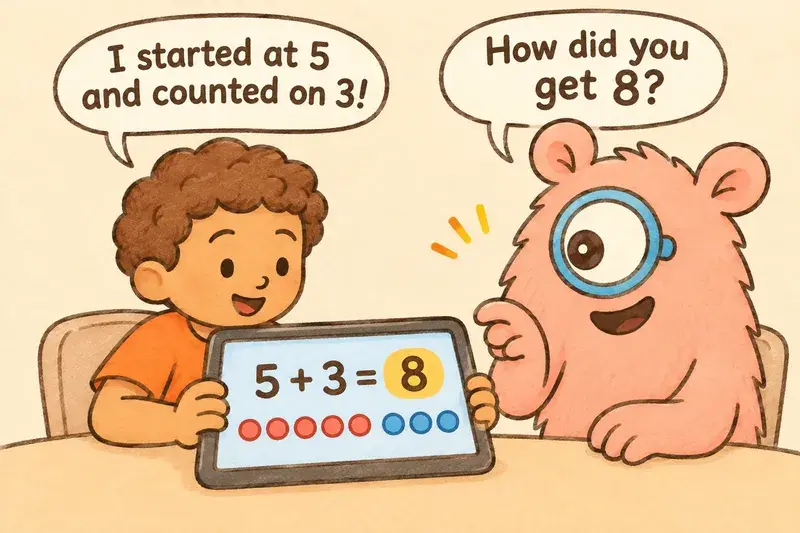
Keep it short and regular. No study we found sets a minute count for 1st graders. As a practical starting point, 10–15 minutes on four or five days a week leaves room for card games and real-world math too.
Match the app to this month's homework. If the class is on place value, a facts-only app won't help with it, however much your child enjoys it.
Mix in some offline play. Our list of 12 math games for 1st grade kids who hate worksheets covers the same skills with cards and dice.
These are practical starting points, not research-based rules.
Where to start this week
Look at the last two pieces of math homework that came home. Are they mostly addition and subtraction strategies, or tens and ones? That answer narrows the list to two or three apps.
If you want to start free, set up a Zearn family account or download Khan Academy Kids, and open Number Frames in a browser for a five-minute make-ten session together. If your child mostly needs calm, untimed practice with addition and subtraction facts, you can start a 7-day free trial of Monster Math and see whether they ask to go back to it. Whatever you pick, sit beside your child for the first few sessions. You'll see whether the app explains mistakes, and whether your child can tell you how they got an answer.
FAQs
What is the best math app for 1st grade?
It depends on what your child is working on. For a free, full year of grade-level lessons, Zearn is the strongest option. For addition and subtraction fact practice, Monster Math, Todo Math or DragonBox Numbers fit. For tens and ones, look at Zearn, Todo Math or DragonBox Big Numbers.
What are the best math apps for 6 year olds?
For most 6-year-olds, Khan Academy Kids (free, ages 2–8), DragonBox Numbers (recommended for ages 4–8) and Monster Math (App Store listing "Made for Ages 6–8") are good starting points. Pair any of them with a free ten-frame app such as Number Frames, used together with a parent.
Are there free math apps for first graders with no ads?
Yes. Khan Academy Kids' App Store listing says it is 100% free with no ads and no subscriptions, and Zearn offers free family accounts and says it doesn't show ads to students. The Math Learning Center's Number Rack and Number Frames are free, and Bedtime Math is free to download. Monster Math is ad-free and free for 10 levels a day, with a paid plan for full access.
How much do math apps help first graders?
They can help, but expect modest gains. A 2021 meta-analysis of 36 studies found an average effect of 0.31 standard deviations for preschool to 3rd grade, and a predicted effect of 0.17 for kindergarten to 3rd grade samples, smaller on standardized tests. Apps that explain wrong answers and adjust levels tend to do better.
What math should a 1st grader practice on an app?
Mainly addition and subtraction within 20, with fluency within 10, using strategies such as counting on and making ten. The second big area is place value: counting to 120 and understanding tens and ones. Measurement, time and shapes are also part of the Common Core 1st grade standards.
Is Monster Math good for 1st grade?
For addition and subtraction fact strategies, yes: it covers 1st grade skills such as adding and subtracting 1 or 2 within 10, doubles within 20 and combinations of 10, with no timers. It doesn't cover place value, time, measurement or shapes, and making ten is listed as coming soon. It is free for 10 levels a day, and full access costs $59.99 a year after a 7-day free trial.
How long should a 1st grader use a math app each day?
No study gives a precise number for 1st graders. As a practical starting point, 10–15 minutes on four or five days a week works for many 6- and 7-year-olds, with you nearby for the first few sessions. Short, regular sessions leave time for offline math games too.
References
Kim, J., Gilbert, J., Yu, Q., & Gale, C. (2021). Measures matter: A meta-analysis of the effects of educational apps on preschool to grade 3 children's literacy and math skills. AERA Open, 7. Open access: https://files.eric.ed.gov/fulltext/EJ1323865.pdf (DOI: 10.1177/23328584211004183)
Meyer, M., Zosh, J. M., McLaren, C., Robb, M., McCafferty, H., Golinkoff, R. M., Hirsh-Pasek, K., & Radesky, J. (2021). How educational are "educational" apps for young children? App store content analysis using the Four Pillars of Learning framework. Journal of Children and Media, 15(4), 526–548. Open access: https://pmc.ncbi.nlm.nih.gov/articles/PMC8916741/ (DOI: 10.1080/17482798.2021.1882516)
National Governors Association Center for Best Practices & Council of Chief State School Officers. (2010). Common Core State Standards for Mathematics: Grade 1. https://www.thecorestandards.org/Math/Content/1/introduction/
Outhwaite, L. A., Early, E., Herodotou, C., & Van Herwegen, J. (2023). Understanding how educational maths apps can enhance learning: A content analysis and qualitative comparative analysis. British Journal of Educational Technology. Open access: https://discovery.ucl.ac.uk/10170561/1/Outhwaite%20et%20al.%202023.pdf (DOI: 10.1111/bjet.13339)
Ramirez, G., Gunderson, E. A., Levine, S. C., & Beilock, S. L. (2013). Math anxiety, working memory, and math achievement in early elementary school. Journal of Cognition and Development, 14(2), 187–202. Author copy: https://sites.temple.edu/cognitionlearning/files/2013/09/Ramirez-et-al-2013.pdf (DOI: 10.1080/15248372.2012.664593)